Feature Summary
AirPage supports Immersive Mode to avoid external distractions and provide an immersive reading and editing experience.
Feature Description
| Feature Dimension | Description |
|---|---|
| Membership Restriction | No membership restriction |
| Version Restriction | No version restriction |
Steps
Enter Immersive Mode
Feature Entry
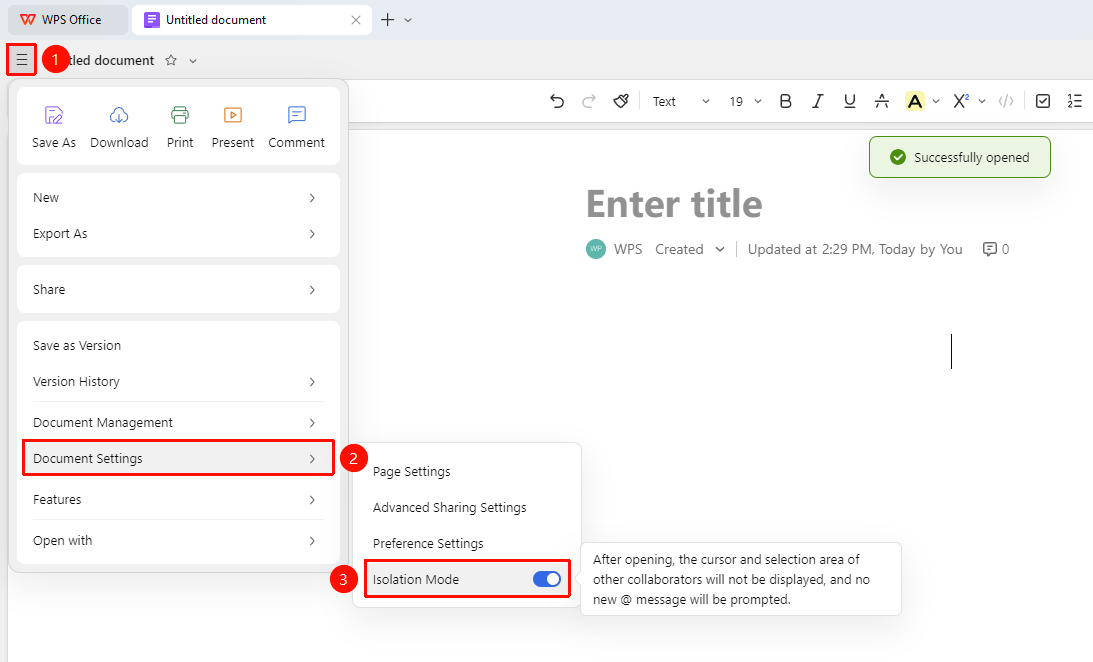
「File Operations」 tab → 「Document Settings」 → 「Isolation Mode」
- Open an AirPage Document and click the 「File Operations」 tab (☰ icon) in the upper left corner
- Click 「Document Settings」
- In the expanded list, click to turn on 「Isolation Mode」
- Once enabled, the cursors and selections of other collaborators are not displayed, and new @mentions are not prompted
- Click again to exit Immersive Mode
Notes
- In Immersive Mode, the cursors and selections of other collaborators are not displayed, and new @mentions are not prompted
- Immersive Mode needs to be manually turned on/off
- It is recommended to enable Immersive Mode when focusing on personal editing