Feature Summary
The subrecord relationship allows records in a data sheet to be linked in a hierarchical structure, making it easy to display the parent-child relationships between main tasks and subtasks, or master nodes and child nodes. Core capabilities include:
- Establishing hierarchical relationships for records
- Displaying records hierarchically in views such as Kanban and Gallery
- Supporting expanding/collapsing subrecords
- Preserving the logical integrity of data hierarchy
Feature Description
| Feature Dimension | Description |
|---|---|
| Membership Restriction | No membership restriction |
| Version Restriction | No version restriction |
Operation Steps
Enabling Subrecords
Feature Entry
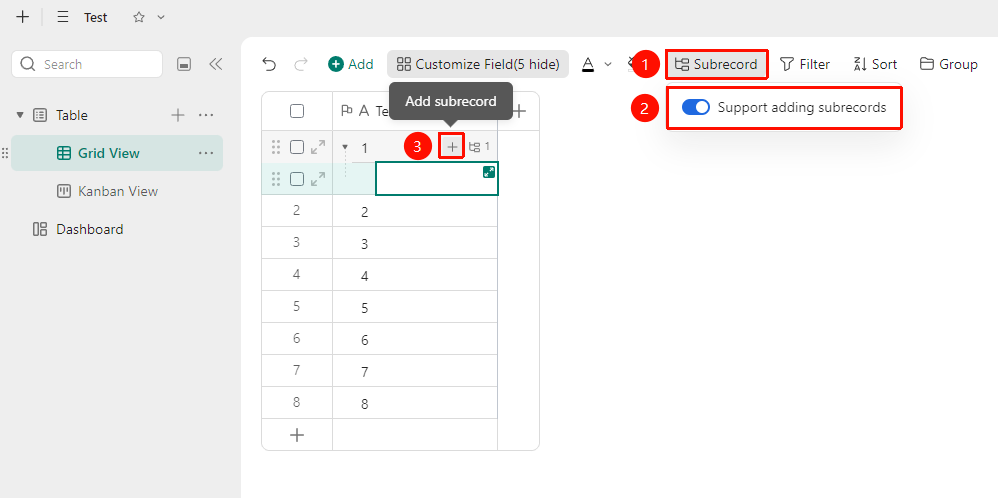
「Toolbar」→「Subrecord」button →「Enable Adding Subrecords」option
- Click the Subrecord button in the toolbar above the multidimensional table
- Turn on the 「Enable Adding Subrecords」 toggle
- After enabling, you can click the 「+」 icon in the first field of a record to add a subrecord
FAQ
Q1: What is the maximum number of levels supported for subrecords?
- Solution: The multidimensional table supports multi-level parent-child nesting, with a maximum of 5 levels of subrecords. Too many levels can affect data display and operational efficiency.
Q2: Will setting parent-child relationships affect statistical formulas?
- Solution: No. Parent-child relationships only affect the display hierarchy in views and do not affect field calculation formulas or statistical results. Summary fields will continue to aggregate data for all records matching the conditions.
Notes
- After establishing a parent-child relationship, subrecords will be displayed in the sheet following their parent record
- When dragging subrecords, be careful to avoid accidentally changing the hierarchical structure