Feature Summary
The sorting feature can arrange records in ascending or descending order based on field values, helping you quickly locate important data or view records chronologically. Core capabilities include:
- Single-field or multi-field combined sorting
- Support for ascending (smallest to largest) and descending (largest to smallest) order
- Support for sorting by multiple field types (text, number, date, etc.)
Feature Description
| Feature Dimension | Description |
|---|---|
| Membership Restriction | No membership restriction |
| Version Restriction | No version restriction |
Operation Steps
Adding a Sort Rule
Feature Entry
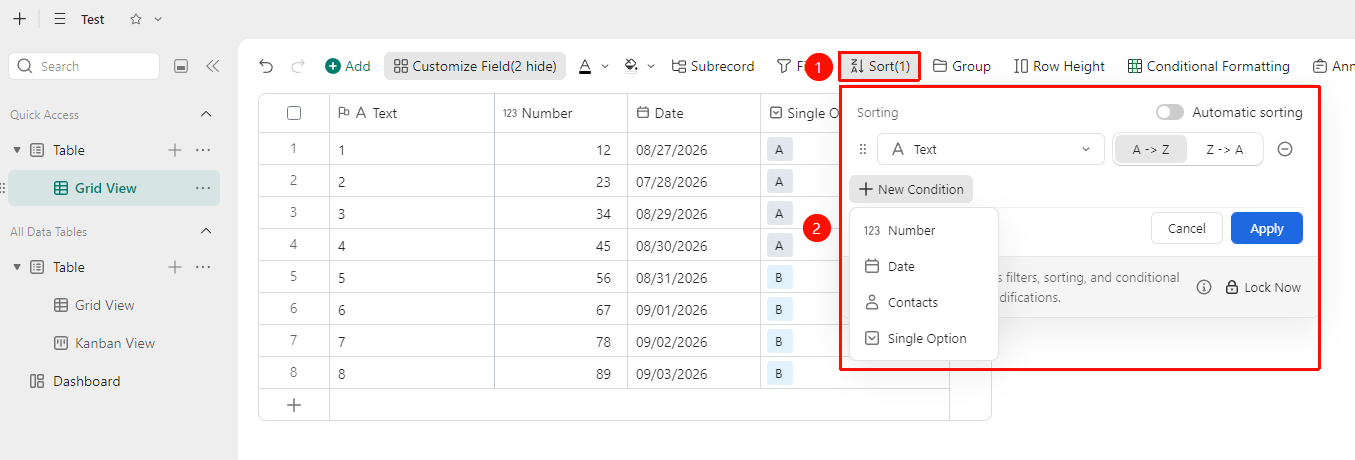
"Toolbar" → "Sort" button → "Sort Criteria" button → Select field and sort order
- Open the target data table and click the Sort button in the toolbar
- Click Sort Criteria and select the field you want to sort by
- Choose Ascending (smallest to largest, A-Z) or Descending (largest to smallest, Z-A)
- The records will be automatically rearranged according to the set rules
- Click the Auto Sort button to enable automatic sorting
- Click the Lock Now button to quickly lock the view.
Setting Up Multi-Field Combined Sorting
Feature Entry
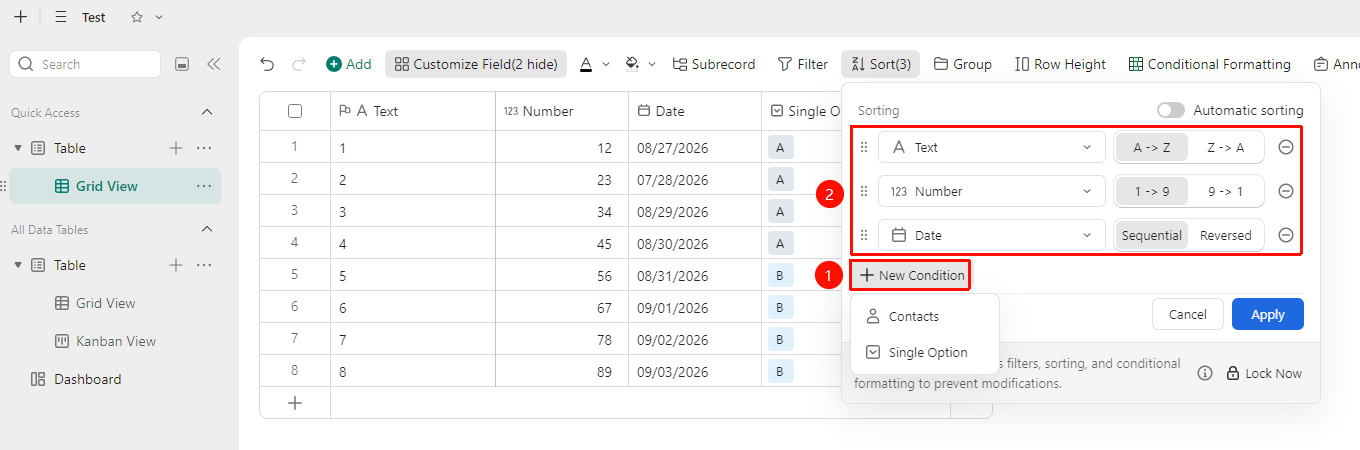
"Toolbar" → "Sort" button → Add field sorting multiple times
- Click Sort Criteria and set the first sorting field and order
- Click Sort Criteria again to add a second sorting field and order
- Sorting priority is from top to bottom; records are sorted by the first field first, then refined by the second field
FAQ
Q1: The sorting result is not as expected. Why?
- Solution: The field's data type may be set incorrectly. For example, text-type numbers will not be sorted by numerical value. You need to change the field type to Number type first and then try sorting again.
Q2: How do I cancel sorting and restore the default order?
- Solution: Click the Sort button in the toolbar and delete the sort criteria.
Q3: Will sorting affect the views of other collaborators?
- Solution: No. Sorting only takes effect in the current View. Different views can have independent sorting rules and will not affect the view display of other collaborators.
Notes
- Sorting only changes the display order of records and does not modify the data content
- Records with empty values are sorted at the end by default
- It is recommended to set unified sorting rules for key fields to facilitate a consistent viewing perspective during team collaboration