Feature Summary
Advanced permission settings provide more granular document permission control, including prohibiting download and print, link expiration, and transferring document ownership, meeting organization-level document security management needs.
Feature Description
| Feature Dimension | Description |
|---|---|
| Membership Restriction | No membership restriction |
| Version Restriction | Collaboration mode must be enabled |
Operation Steps
Setting Permissions
Feature Entry
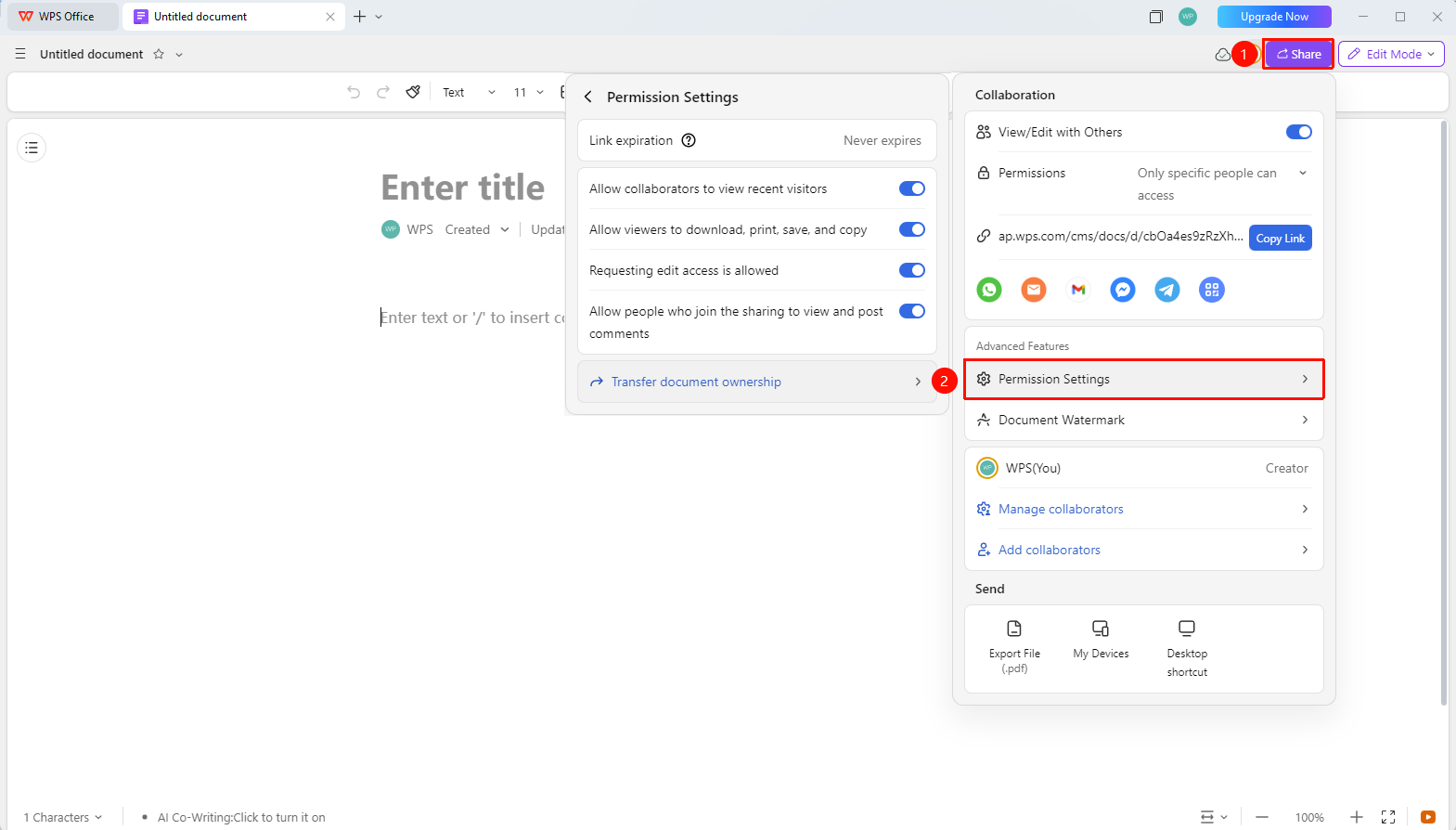
「Share」→「Permission Settings」
- Open the document and click the 「Share」 button in the upper right corner
- Click 「Permission Settings」 to expand the menu panel
- The following can be set:
- 「Link Expiration」 : Set the expiration period for this document link (7 days/30 days/Permanent)
- 「Allow collaborators to view recent visitors」 : Whether to allow collaborators to view the visitor list
- 「Allow collaborators to download, print, save as, and copy」 : Whether to allow collaborators to download, print, save as, and copy the content of this document
- 「Allow applying for edit permission」 : Whether to allow collaborators to apply for edit permission for this document
- 「Transfer Document Ownership」 : Transfer document ownership to another user
4.After the settings are completed, permission settings will be refreshed in real time.
FAQ
Q1: If downloading is prohibited, can the other party still see the content?
- Solution: Yes. Prohibiting downloading only restricts export and copy operations, and does not affect online viewing.
Q2: Can a collaborator still access the document after being removed?
- Solution: If the link permission is set to 「Anyone can edit/view」, the removed person can still access it via the link. You need to simultaneously change the link permission to 「Specified people」.
Q3: Do permission settings apply to all sharing methods?
- Solution: Yes. Whether sharing via link, QR code, or direct invitation, all are subject to the restrictions of permission settings.
Notes
- Advanced permission settings can effectively protect document security
- The content of permission settings differs between personal accounts and organization accounts
- Permission settings take effect immediately without the need to re-share
- Regularly review the collaborator list and promptly remove unnecessary members