Feature Summary
The product key feature is used to activate membership benefits, supporting the input of membership redemption codes to activate WPS Pro+/WPS Pro+ Sharing Plan.
Feature Description
| Feature Dimension | Description |
|---|---|
| Membership Restrictions | No membership restrictions |
| Version Restrictions | No version restrictions |
Operating Steps
Enter Product Key
Access Method
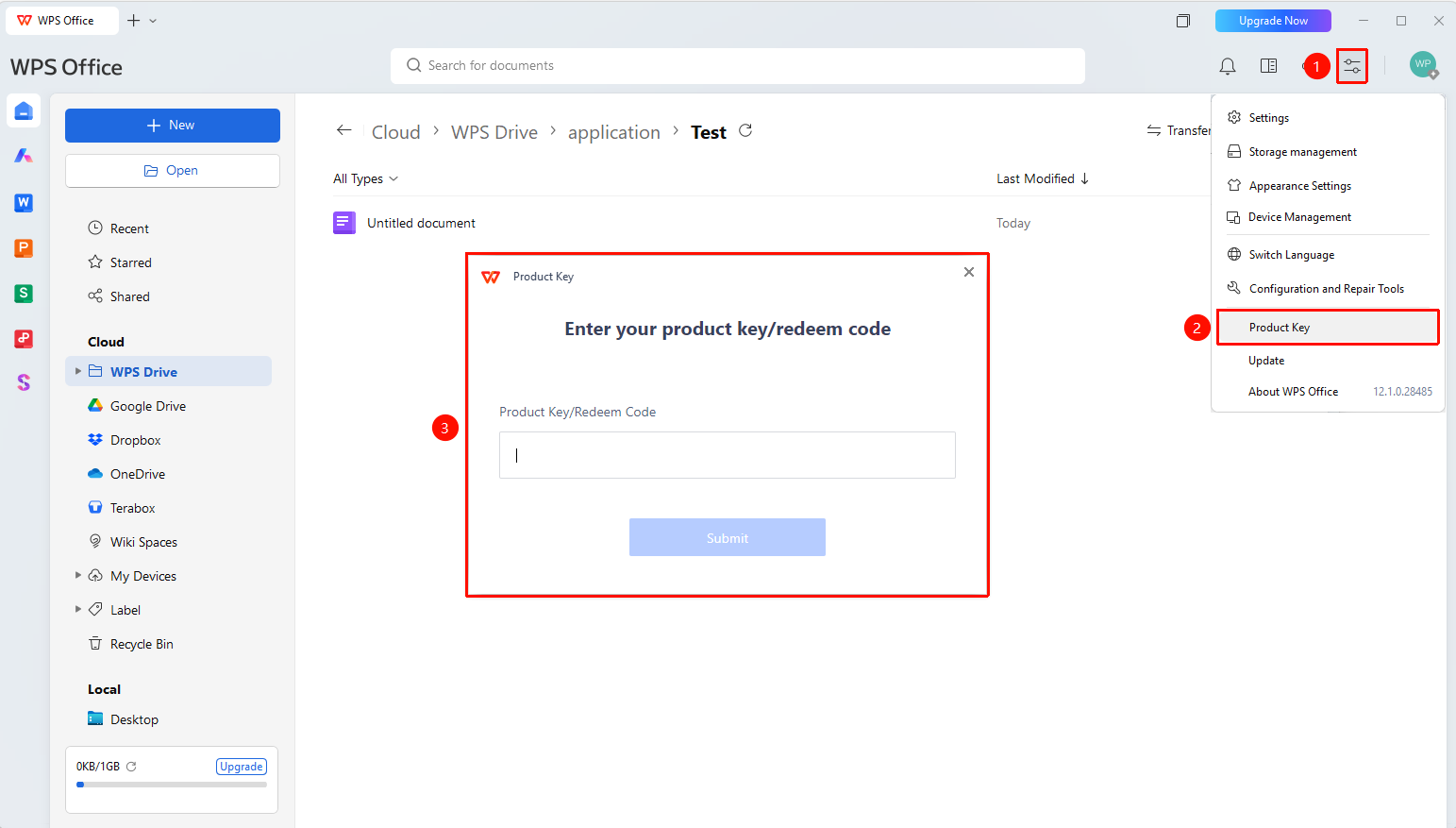
Click the "Global Settings" button → Select "product Key/redeem code"
- Open the WPS client
- Click the "Global Settings" button (icon: "≡") in the upper-right corner
- In the pop-up menu, locate "product Key/redeem code"
- Click it and enter a valid product key in the input field
- Click the "Submit" button to complete activation
Frequently Asked Questions
Question 1: How do I obtain a product key/redeem code?
- Solution: product Key//redeem code are provided by the sales channel.
Notes
- The product key is used to activate WPS Pro+/WPS Pro+ Sharing Plan benefits.
- After activation, you can view your membership information on the "Personal Center" page.