Feature Summary
Supports enabling/disabling the feature to close a document by double-clicking its tab. Once enabled, double-clicking a tab quickly closes the document, improving operational efficiency.
Feature Description
| Feature Dimension | Description |
|---|---|
| Membership Restriction | No membership restriction |
| Version Restriction | No version restriction |
Operation Steps
Mouse Double-Click to Close Tab
Feature Entry
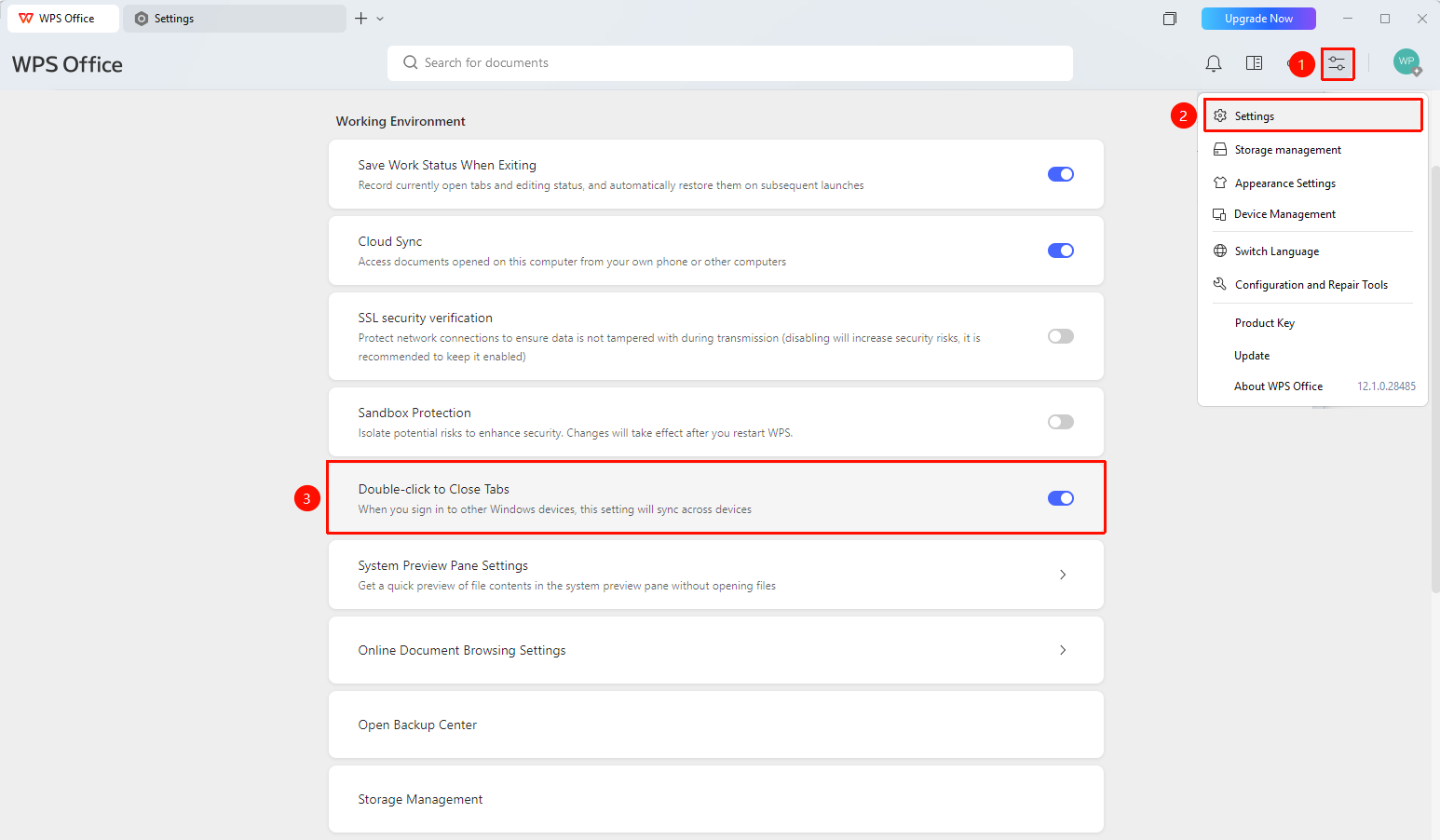
"Global Settings" button → "Settings" option → "Mouse Double-Click to Close Tab" toggle
- Click the Global Settings button at the top right of the WPS home page
- Click the Settings button
- Enable "Mouse Double-Click to Close Tab"
- Once enabled, you can close a tab in the tab bar by double-clicking it
FAQ
Q1: Where do I double-click to close after enabling this feature?
- Solution: Double-click on a document tab to close the current document.
Q2: How do I close a tab after disabling this feature?
- Solution: You can click the close button on the right side of the tab or use a shortcut to close the document.
Q3: Does this feature affect document saving?
- Solution: If there is unsaved content before closing, WPS will prompt you to save, ensuring document data safety.
Notes
- After enabling, double-click a tab to quickly close the document.
- A prompt to save unsaved content will appear before closing.
- The setting takes effect immediately.