Feature Summary
The WPS client supports two window management modes: Integrated Mode and Multi-Component Mode. Integrated Mode centrally manages different document types, while Multi-Component Mode organizes windows by document type. A restart is required for the change to take effect.
Feature Description
| Feature Dimension | Description |
|---|---|
| Membership Restriction | No membership restriction |
| Version Restriction | No version restriction |
Operation Steps
Switch Window Management Mode
Feature Entry
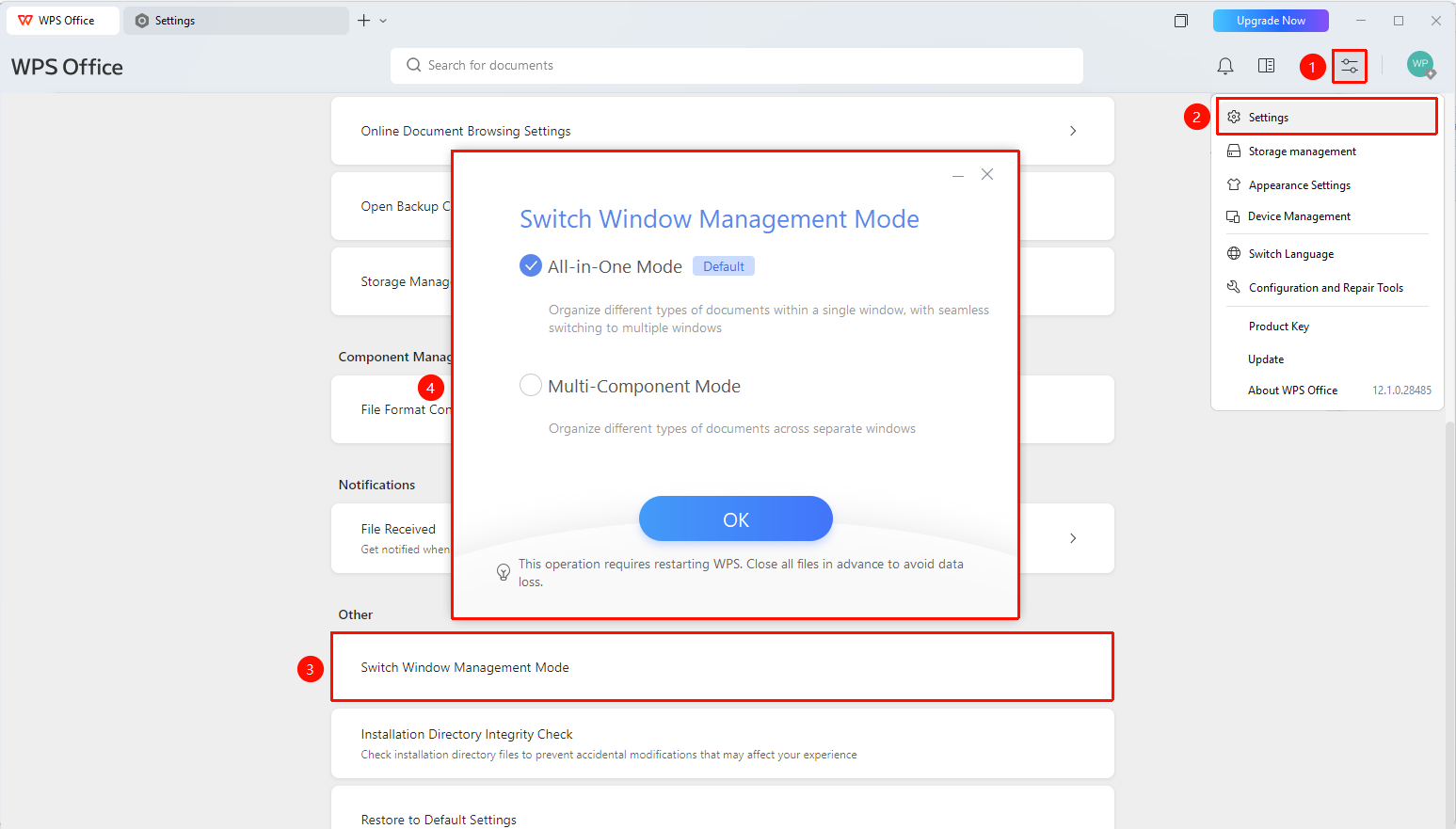
"Global Settings" button → "Settings" option → "Switch Window Management Mode"
- Open the WPS client
- Click the "Global Settings" button in the upper right corner
- Select the "Settings" option
- Scroll to the bottom of the settings page and click "Switch Window Management Mode"
- Select the target mode in the pop-up dialog box:
- "Integrated Mode (Default)": Different document types can be displayed in the same window, supporting free splitting into multiple windows
- "Multi-Component Mode": Tabs for different document types are placed in different windows
6.Click the "OK" button
7.Restart the WPS client for the change to take effect
FAQ
Question 1: What is the difference between Integrated Mode and Multi-Component Mode?
- Solution: In Integrated Mode, all document tabs are managed in the same window, supporting free splitting into multiple windows; Multi-Component Mode assigns different document types (Docs/Sheets/Slides) to different windows for independent management.
Question 2: Is a restart required after switching modes?
- Solution: Yes, you need to restart the WPS client after switching window management modes for the change to take effect. It is recommended to close all files in advance to avoid data loss.
Question 3: Will document data be lost after switching modes?
- Solution: No, switching modes only changes the window organization method, and document data will not be affected.
Notes
- After switching the window management mode, you need to restart the WPS client for the change to take effect.
- Before switching, please save and close all files in advance to avoid data loss.
- Integrated Mode is the default mode, supporting free splitting and management of multiple documents in the same window.
- Multi-Component Mode assigns different document types (Docs/Sheets/Slides) to different windows.