Summary
When you feel that a paragraph is not substantial enough or its arguments are not fully developed, AI Expand can enrich details and add supporting arguments and examples while preserving the original meaning, helping you improve the depth and persuasiveness of your article.
Feature Description
| Feature Dimension | Description |
|---|---|
| Membership Limits | Available for both WPS Pro+ and WPS Premium |
| Version Limits | Applicable to the latest version on the WPS official website |
Operating Steps
AI Expand
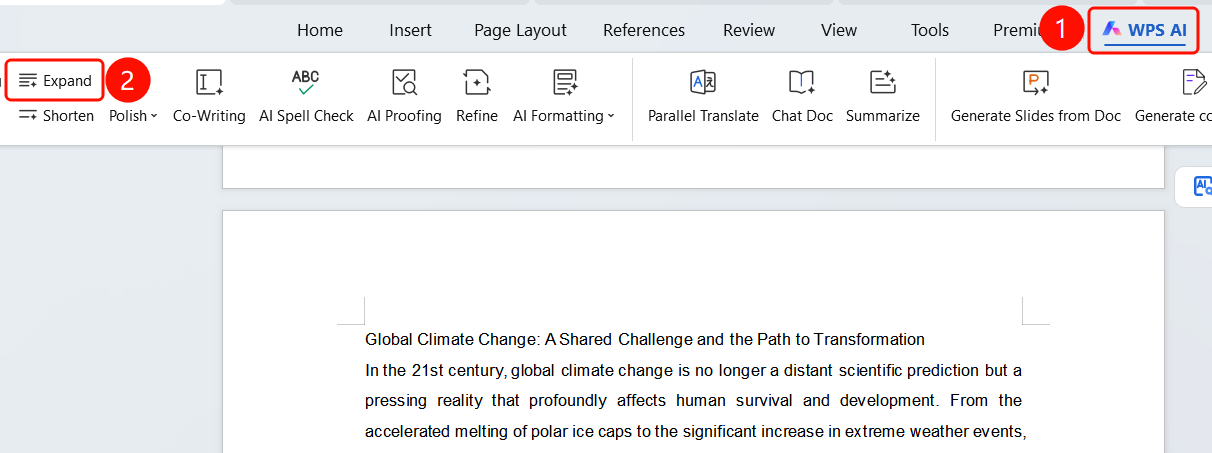
Feature Entry ①
"WPS AI" tab > "Expand"
- Select the text paragraph that needs to be expanded.
- Click the WPS AI tab on the top menu bar.
- Click the Expand button (three horizontal lines icon).
- The AI will automatically expand the selected text.
Feature Entry ②
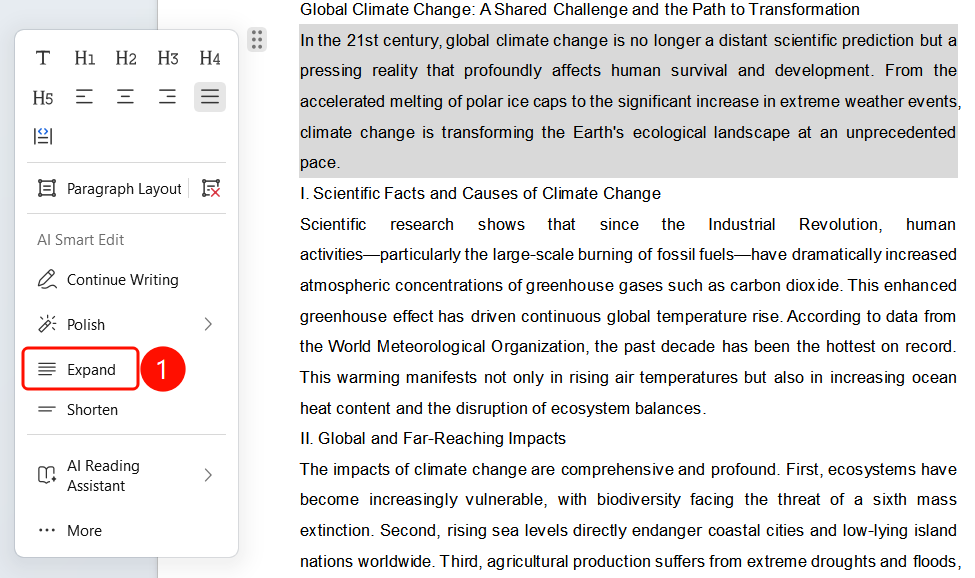
Paragraph handle > "Expand"
- Select the text paragraph that needs to be expanded.
- Click the paragraph handle (six-dot matrix icon) that appears on the left side of the selection.
- Select Expand from the pop-up menu.
- The AI will automatically expand the content.
View Expansion Results
Feature Entry
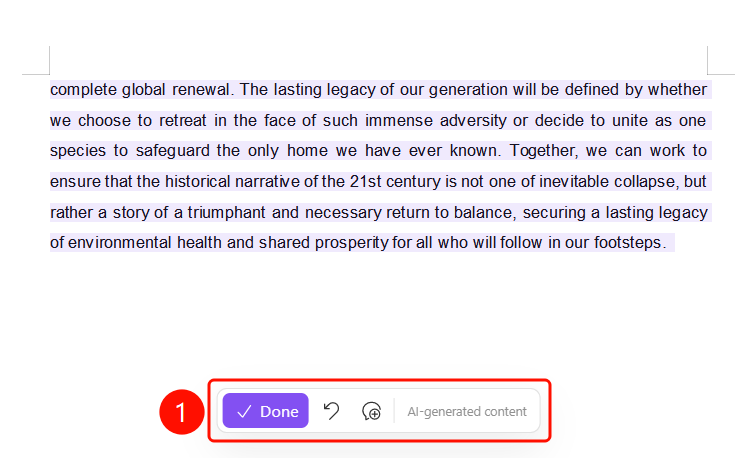
Bottom floating action bar
After the AI expansion is completed, the expanded text is highlighted in SlateGray.
The original text is displayed in gray, and the expanded content is displayed in dark text for easy comparison.
The bottom floating action bar contains:
- Done (SlateGray button, checkmark icon): Confirm and accept the expansion results
- Undo (curved arrow icon): Undo the expansion operation
- Regenerate (circular arrow icon): Re-expand the content
The Generated by AI label is displayed at the bottom.
FAQ
Q1: Will AI Expand change the original meaning of the text?
- Solution: AI Expand will enrich details and add supporting arguments and examples while preserving the original meaning. It will not change the core meaning of the original text.
Q2: Can I regenerate the content if I am not satisfied with the expansion?
- Solution: Yes. Click the Regenerate button (circular arrow icon) on the bottom floating action bar, and the AI will expand the text again. You can also click Undo to restore the original text.
Q3: How do I control the degree of expansion?
- Solution: Selecting a shorter text segment will make the AI expansion more focused. Selecting an entire paragraph will allow the AI to enrich and supplement the content from a global perspective.
Notes
- There is no limit on the number of times WPS Plus and Premium members can use the AI Expand feature.
- After expansion, the original text is displayed in gray, and the expanded content is highlighted in SlateGray for easy comparison.
- The expansion is generated based on the context. The more specific the selected content is, the more accurate the expansion will be.