Feature Summary
When you want to turn a large block of text into individual items, AI Text Conversion can list and output the content point by point while preserving core information, helping your content become more structured and orderly.
Feature Description
| Feature Dimension | Description |
|---|---|
| Membership Limits | Available for both WPS Pro+ and WPS Premium |
| Version Limits | Applicable to the latest version on the WPS official website |
Operating Steps
AI Text Conversion
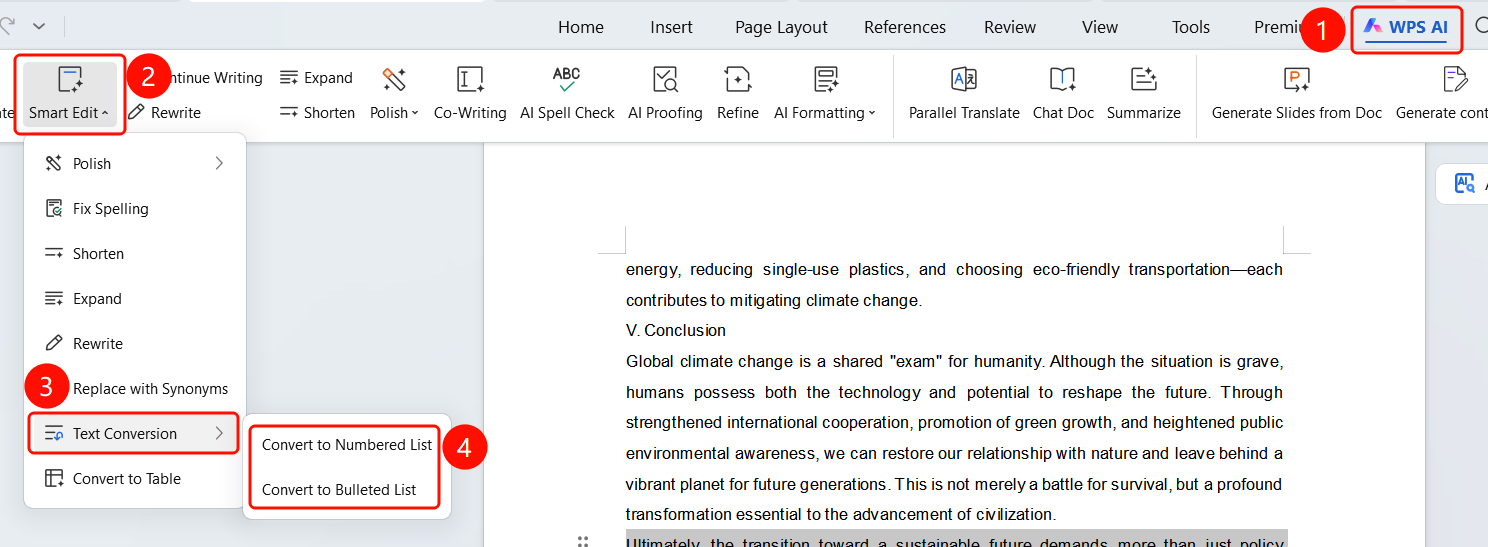
Feature Entry ①
"WPS AI" tab → "Smart Edit" → "Text Conversion"
- Select the text you want to convert.
- Click the WPS AI tab on the top menu bar.
- Click the Smart Edit button.
- Select Text Conversion from the dropdown menu.
- The submenu provides conversion methods: Convert to Numbered List and Convert to Bulleted List.
Feature Entry ②
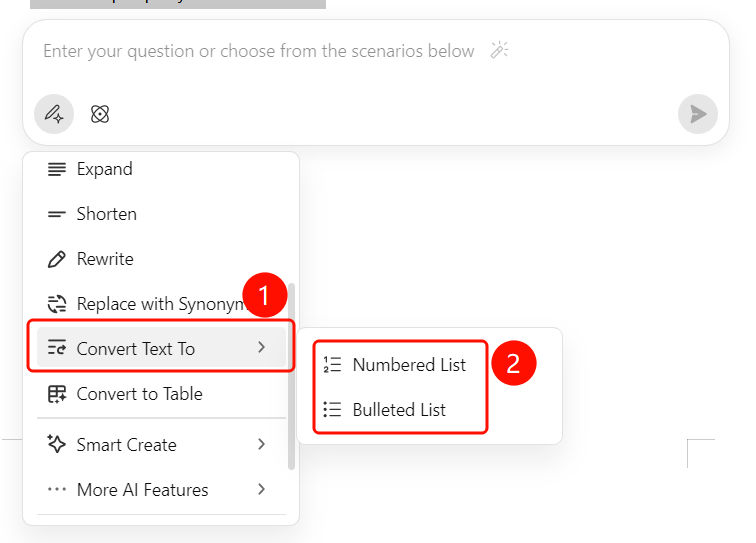
Paragraph handle → "More" → "Text Conversion"
- Select the text you want to convert.
- Click the paragraph handle to expand the menu.
- Select Text Conversion → Convert to Numbered List or Convert to Bulleted List.
View Conversion Results
Feature Entry
Bottom floating action bar
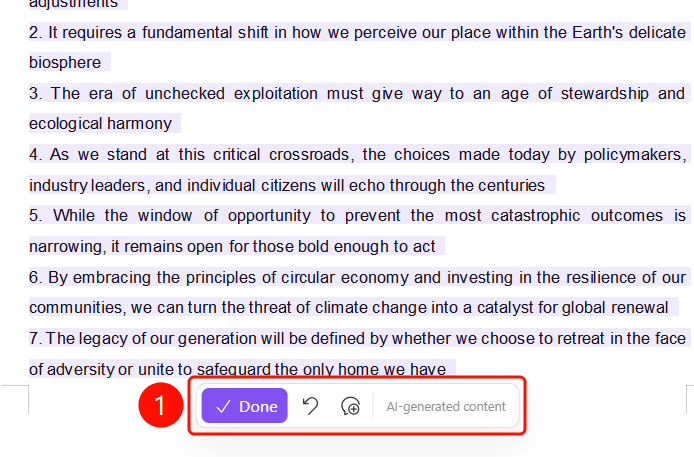
After the AI conversion is complete, the original text is displayed in gray.
The converted content is highlighted in SlateGray (such as a numbered list).
The bottom floating action bar contains:
- Done (SlateGray button): Confirm and accept the conversion results
- Undo: Undo the conversion
- Regenerate: Reconvert the text
The Generated by AI label is displayed at the bottom.
FAQs
Q1: What conversion methods does Text Conversion support?
- Solution: It supports two methods: "Convert to Numbered List" (converts paragraphs into a numbered list) and "Convert to Bulleted List" (converts paragraphs into a bulleted list).
Q2: Can I undo the conversion?
- Solution: Yes. Click the "Undo" button on the bottom floating action bar to restore the original text. You can also click "Regenerate" to convert again.
Q3: Will content be lost after conversion?
- Solution: No. AI Text Conversion will output structured content while preserving core information. The original text is displayed in gray for easy comparison.
Notes
- WPS Plus and Grand VIP members have unlimited use of the AI Text Conversion feature.
- After conversion, the original text is displayed in gray, and the conversion results are highlighted in SlateGray.
- "Convert to Numbered List" is suitable for scenarios requiring sequential numbers, while "Convert to Bulleted List" is suitable for scenarios requiring bullet points.