Feature Summary
When you need to ensure document quality and check for typos and grammatical errors, AI Deep Proofing performs a comprehensive check (including spelling mistakes, grammar issues, punctuation standards, and expression consistency) to help you deliver error-free, high-quality documents.
Feature Description
| Feature Dimension | Description |
|---|---|
| Membership Limits | Available for both WPS Pro+ and WPS Premium |
| Version Limits | Applicable to the latest version on the WPS official website |
Operating Steps
AI Deep Proofing
Feature Entry
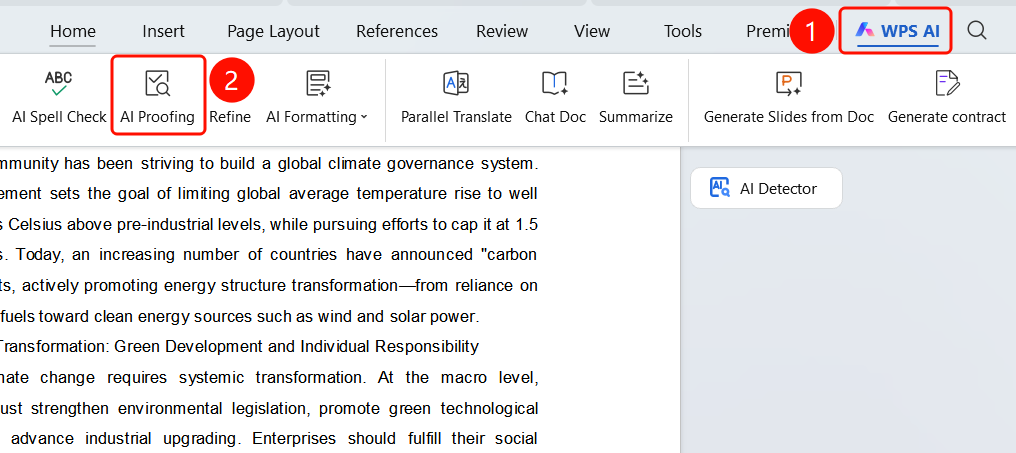
"WPS AI" tab -> "AI Proofing"
- Open the document that needs proofing.
- Click the "WPS AI" tab on the top menu bar.
- Find and click the "AI Proofing" button.
- AI will automatically check the entire document.
View Proofing Results
Feature Entry
AI Proofing sidebar
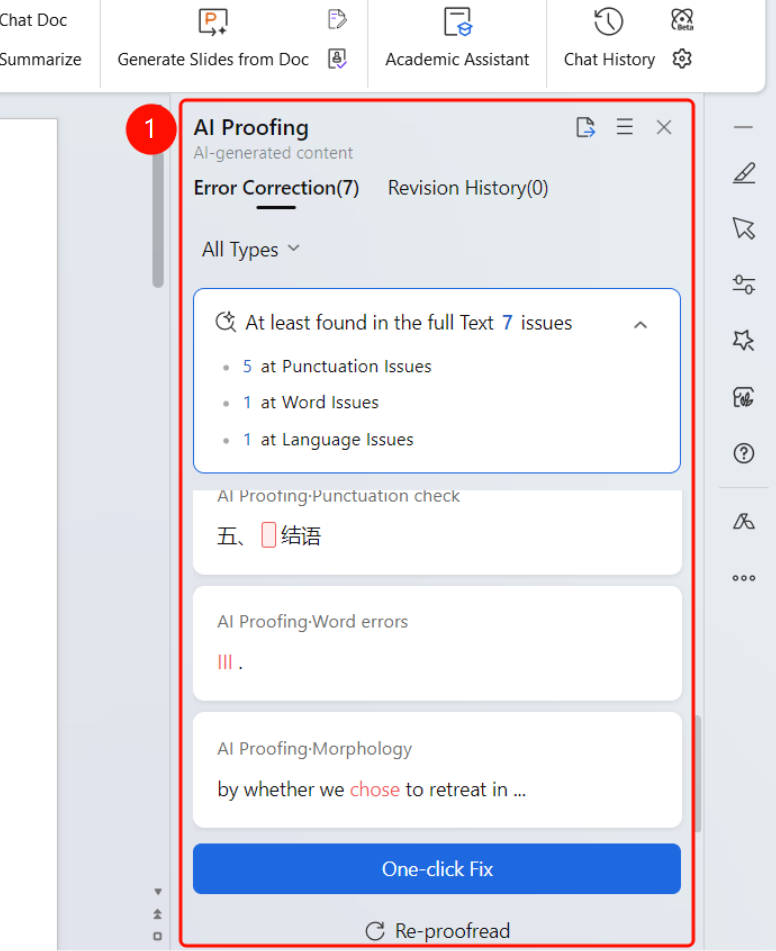
After proofing is complete, the "AI Proofing" sidebar will slide out on the right.
Two tabs are displayed at the top:
- "Corrections": Shows the number of issues found
- "Revision History": Shows the modified content
Statistics display the total number of issues found in the document, classified by type:
- Spelling issues (such as typos)
- Grammar issues (such as improper word usage)
- Punctuation issues (such as missing punctuation)
Below each suggestion, the following options are provided:
- "Ignore": Skip the issue
- "Accept": Accept the modification suggestion
An "Accept All" button is provided at the bottom to apply all suggestions in bulk.
Complete Proofing
Feature Entry
AI Proofing sidebar -> Proofing completed status
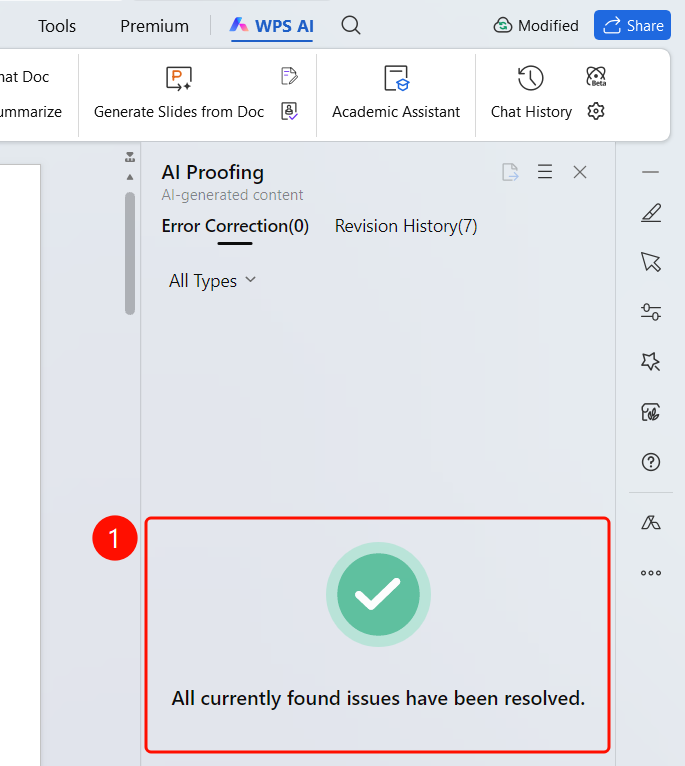
- After all issues are resolved, a green checkmark icon is displayed in the sidebar.
- A message "All issues found have been resolved" will appear.
- The number of corrections returns to zero, and the revision history shows the number of modifications made.
Frequently Asked Questions
Question 1: What is the difference between AI Proofing and AI Spell Check?
- Solution: AI Spell Check is a lightweight, quick check. AI Deep Proofing is a comprehensive check that includes multi-dimensional proofing such as spelling mistakes, grammar issues, punctuation standards, and expression consistency.
Question 2: Can I correct all issues with one click?
- Solution: Yes. Click the "Accept All" button at the bottom of the sidebar, and AI will apply all suggestions in bulk. You can also click "Accept" on individual items to make selective corrections.
Question 3: Can I recheck after proofing?
- Solution: Yes. Click the "Reproof" button at the bottom of the sidebar, and AI will check the entire document again.
Notes
- WPS Plus and Premium members have unlimited access to the AI Deep Proofing feature.
- Proofing results are categorized and displayed as spelling issues, grammar issues, and punctuation issues.
- You can accept or ignore suggestions one by one, or apply all corrections in bulk with one click.